Price with the costs in view
Include ingredient yield, labor, overhead and packaging before comparing cost with selling price.
FOR CAFES, BAKERIES & SMALL KITCHENS
Recipe Cost
Bring ingredients, labor and packaging into one recipe cost. See what each serving costs, update shared ingredients and plan the next batch on your Android device.
From your first menu item to a reusable recipe library.
See the real app screens ↓Paid app. One purchase includes the local tools. Optional cloud sync is a separate subscription.
See Google Play for the price in your country. Prices and availability may vary.
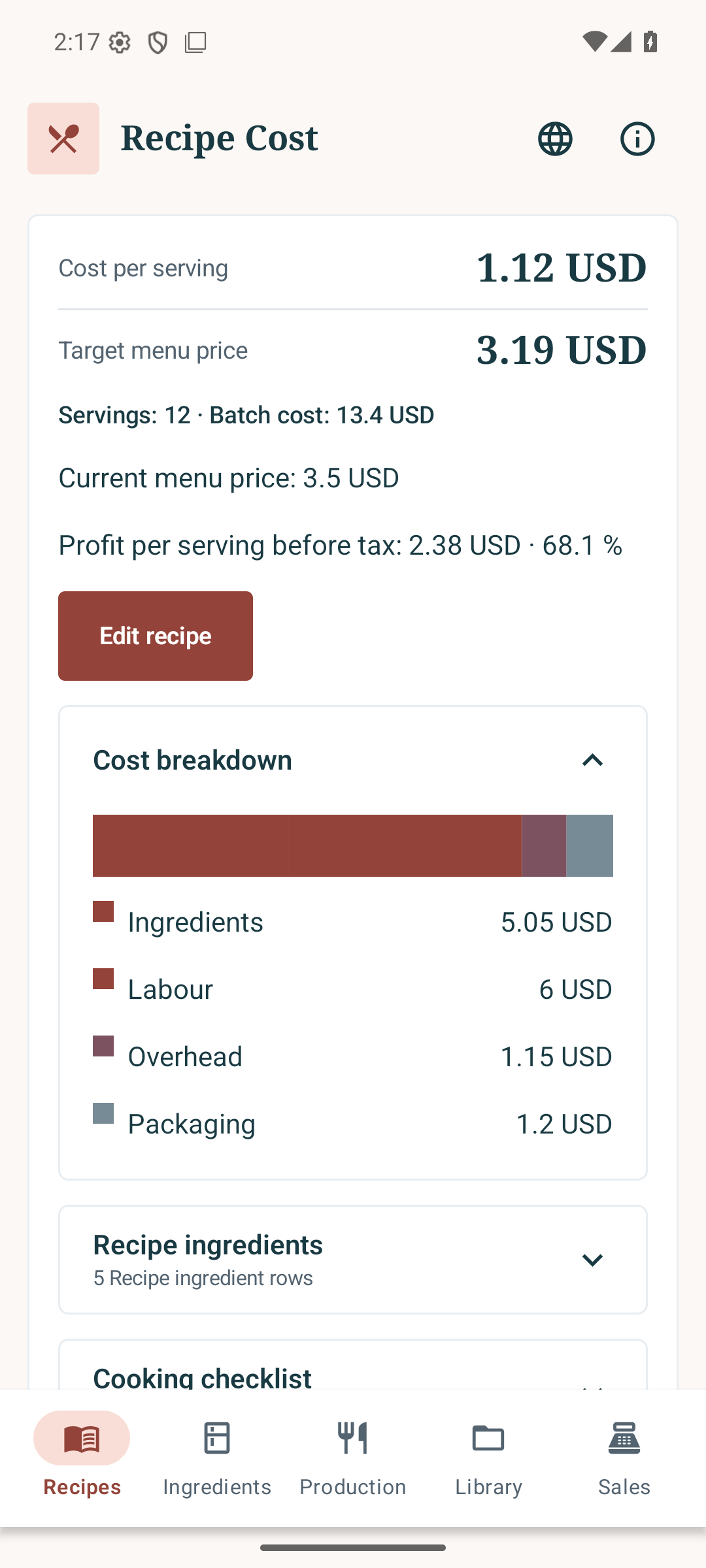
ILLUSTRATIVE COOKIE RECIPE · 12 SERVINGS
Fictional USD example, tax 0%. Entered costs, not actual sales or business net profit. This is not conversion to your local currency.
Include ingredient yield, labor, overhead and packaging before comparing cost with selling price.
Shared ingredients connect your recipes. Recalculate linked costs when a supplier price changes.
Combine planned batches, subtract stock on hand and calculate whole packs to buy.
How it works
Enter purchase quantities, prices and usable yield for each ingredient.
Add quantities, servings, labor, overhead and packaging. Review the cost and your target selling price.
Scale production, review shopping needs and save cost versions. Export a cost sheet or CSV table.
The official Cairo-san guides this edited original app-screen video. No audio. Captions: English. App screens: English. Fictional examples; not an uncut recording of taps. Historical screen version: 2026-09-28 (USD example). Check Google Play for current features and regional pricing. Cairo-san avatar model: kh.
English app screens with invented USD prices. This is one example, not automatic conversion to your country’s currency or evidence of actual sales. The first 24.33 seconds show real Android operation at 4× speed; the final 15 seconds show actual app stills and its native PDF. Native CSV values are preserved; page summaries round amounts to two decimals. Enter your own prices, costs and tax rate. Silent video; select subtitles.
Recipe Cost
Keep recipes, shared ingredients and production quantities connected. Open the images to inspect the actual interface.
Open full-size image ↗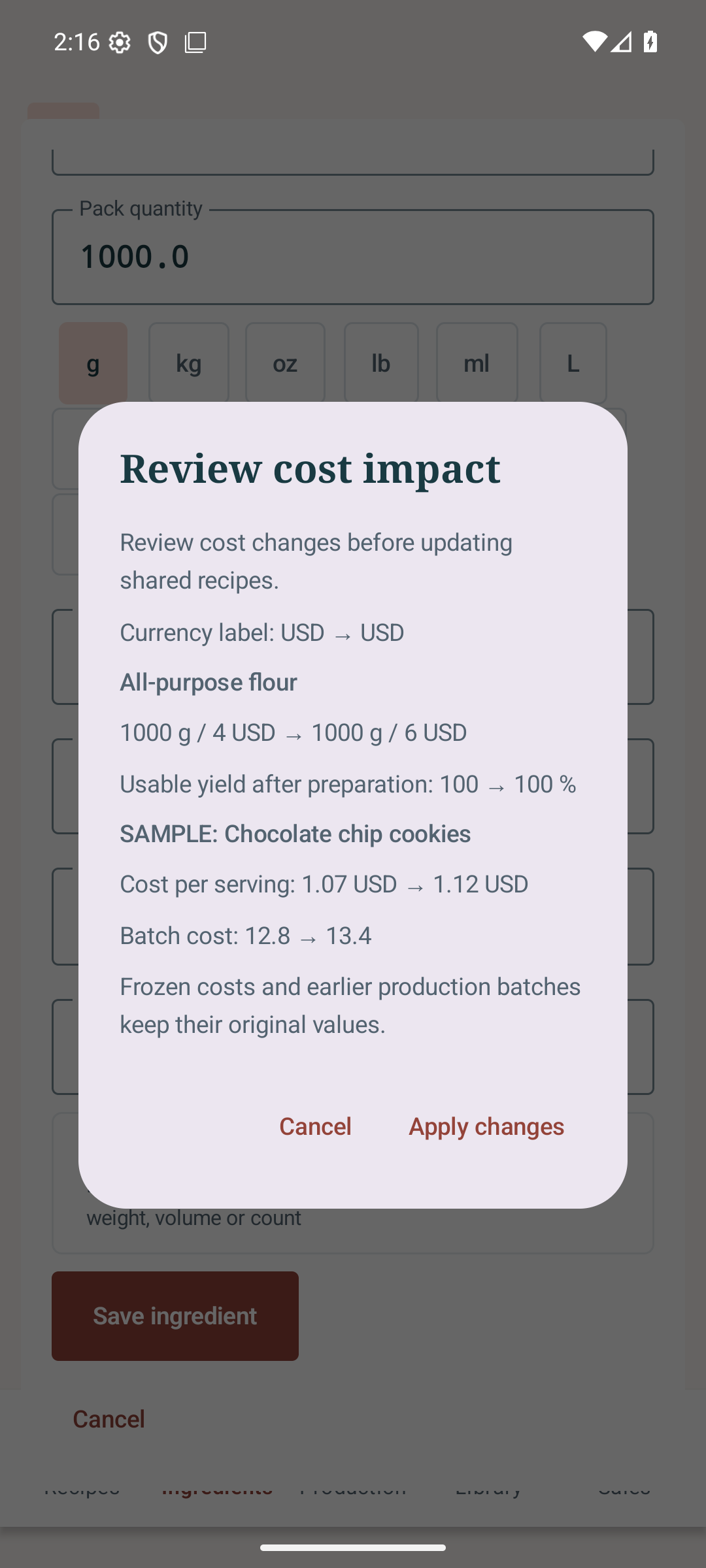 Open full-size image ↗
 Open full-size image ↗
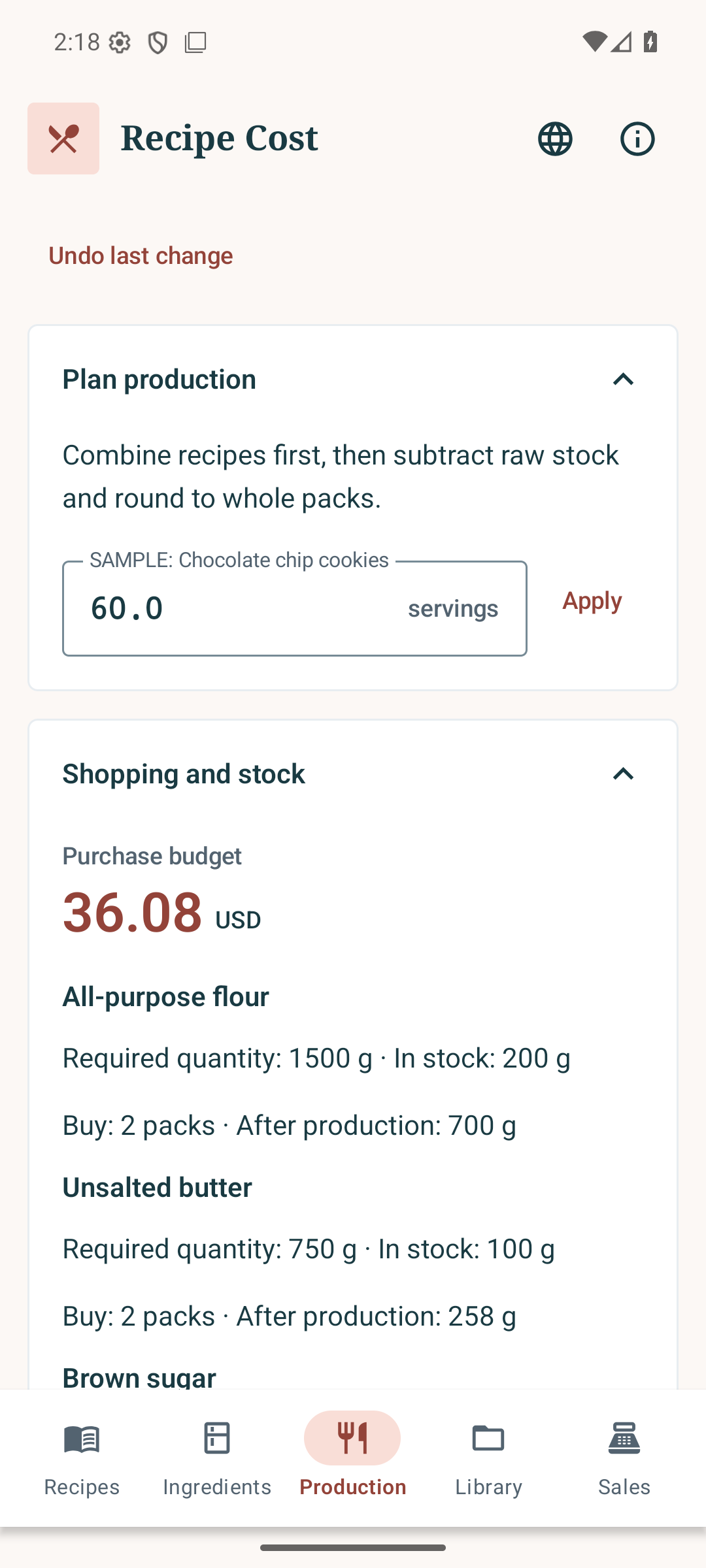
Actual English app screens with fictional USD inputs. The interface supports ten languages. The “profit” figure subtracts entered costs only; it is not business net profit.
Real output
Inspect the unchanged English/USD PDF and CSV files exported by the actual app. The shopping list uses the same USD sample library.
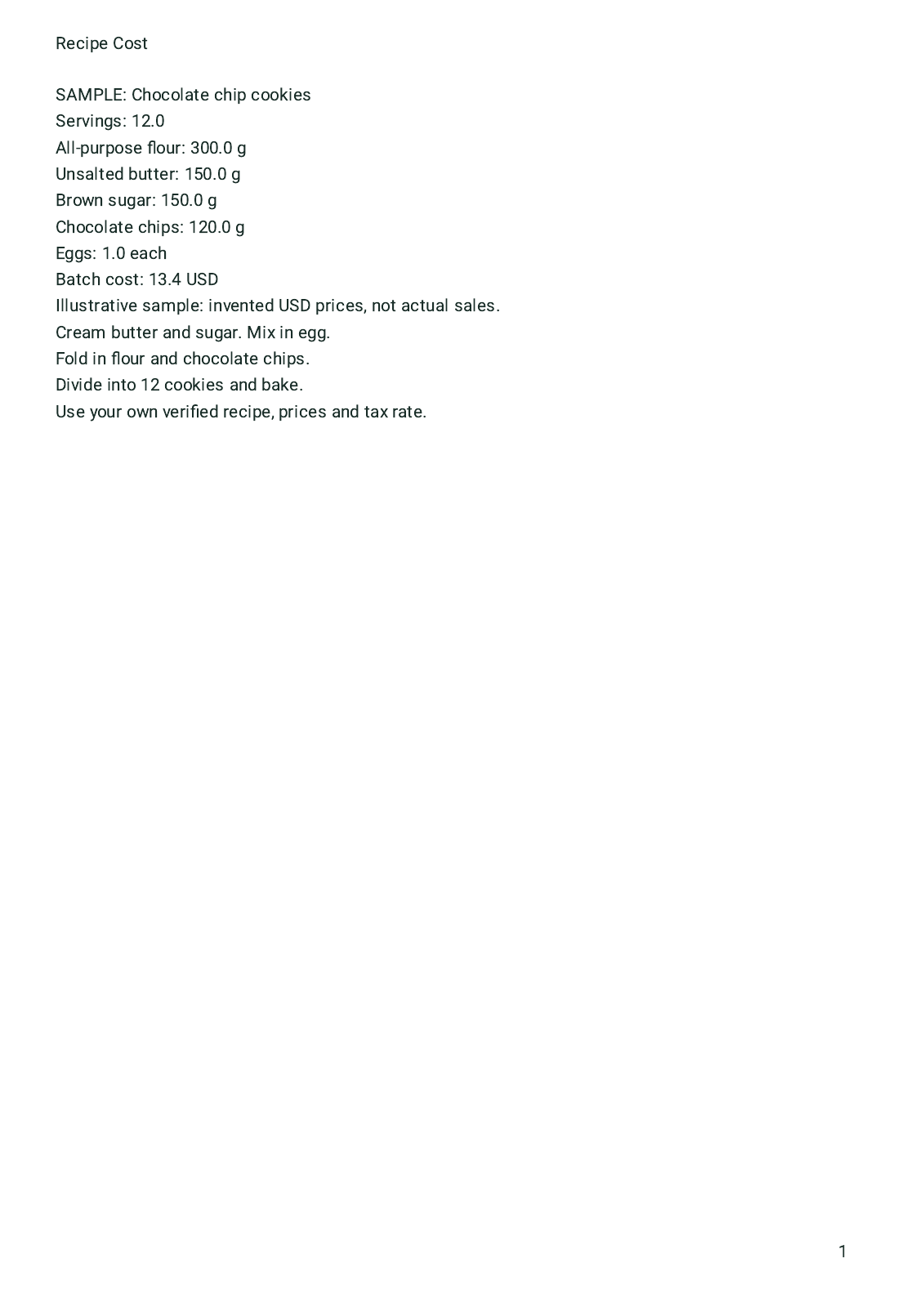
ILLUSTRATIVE COOKIE RECIPE · 12 SERVINGS
Flour rises from USD 4.00 to USD 6.00 per 1,000 g. The 12-cookie batch rises from USD 12.80 to USD 13.40; the displayed cost per cookie changes from USD 1.07 to USD 1.12. The selling price stays USD 3.50. Planning 60 cookies produces a USD 36.08 purchase budget after subtracting sample stock.
Fictional USD example, tax 0%. Entered costs, not actual sales or business net profit. This is not conversion to your local currency.
These are native app exports, with their original layout and values. CSV calculations retain unrounded floating-point values; this page rounds money to two decimals. The shopping CSV has no currency column; its USD basis is shown in the app. Exports are PDF and CSV, not Excel workbooks.
Features & limits
The app selects a supported device language on first launch. You can change it inside the app. Your manual choice is saved. Unsupported languages use English; Chinese uses Traditional Chinese.
Uses your browser language by default. Your selected language is saved. Language settings ↑
Recipe Cost is a paid Android app. The one-time purchase includes local costing, recipes, production, sales records and exports. Cloud sync is optional and separately subscribed. Google Play shows the current price and availability in your region.
Yes. Local tools work without an account. Export a full library backup to keep a copy or move it to another device. Cloud sync requires an account and an optional paid plan.
Import ingredients, supplier prices and sales from CSV or XLSX, and recipes from CSV. Map columns and review changes. Convert formula cells to values first. Exports are PDF and CSV.
Saved work and linked files can be copied across your devices while the app is open. Unsaved edits and separate project-library copies are excluded. You choose which copy to use when versions differ. Each account has 1 GB per app, shared by up to 20 versions. Existing cloud copies remain downloadable or deletable after the plan expires.
Check the workflow, inspect the exports and see the current local price on Google Play.
Optional Business in production version 0.6.3 is available only in Japan. It includes price reviews, sales comparisons, cost simulations and cloud sync. Existing app tools remain available without Business. The app’s distribution regions and Business availability are different. Check the app and Google Play for current prices, billing periods and conditions.
Tell us about the recipes, costing or production workflow you need. We can help you check whether Recipe Cost fits.
With your consent, we count page views, video plays, sample file openings, clicks to Google Play and successful inquiry submissions (without their content) to improve this page. Results are grouped by app, display language and broad traffic source. Names, email addresses, inquiry content, full URLs and IP addresses are not stored in the analytics data. We do not use cookies to identify individuals for this measurement. These actions do not indicate completed purchases. Your choice is saved in this browser and can be changed at any time.
May we collect anonymous usage statistics to improve this page?
Measurement is disabled
Privacy policy